One diocese. Every parish. One set of rules.
A diocese is not a bigger church — it is a hierarchy with its own governance, its own reporting and its own obligations. ChurchPlan models that hierarchy in the data itself, so a network is one platform with every module inside it, not thirty unrelated accounts that happen to share a logo.
Two ways to see a diocese.
The same network, the same parishes, the same records — arriving two very different ways.
The structure your network already has.
Most church software has one level: the church. A diocese ends up as a folder of separate logins, separate exports and a volunteer stitching spreadsheets together every quarter. ChurchPlan has five levels — including the districts and groups a real network is organised into — and every permission, report and audience setting understands all of them.
The network. Central administration, cross-parish reporting, subscription oversight, and announcements that reach every parish feed at once.
Churches cluster into the regions your network actually uses — North District, South District — each with its own group admin. Churches that belong to no group sit directly under the diocese.
Each parish runs its own giving, events, liturgies and people — with its own funds, its own payouts, its own church manager and its own member records.
Sunday School classes, youth groups, choirs, committees — each with its own servants, roster and availability.
One record per person, held by their parish, carried in their pocket — and never duplicated across the network.
Set once at the diocese. Felt in every parish.
Control flows down. Evidence flows back up. And when the diocese steps into a parish, that parish can see it happening. Watch one cycle, or pick a step.
Set a role, a safeguarding rule or an announcement once at the diocese and it reaches every district and every parish — including the ones that report directly, with no district in between.
Every parish in the network, on one screen.
Open the diocese portal and the whole network is in front of you — grouped into your districts, each with its own group admin, each parish showing who runs it, how many members it has, and whether it needs attention today.
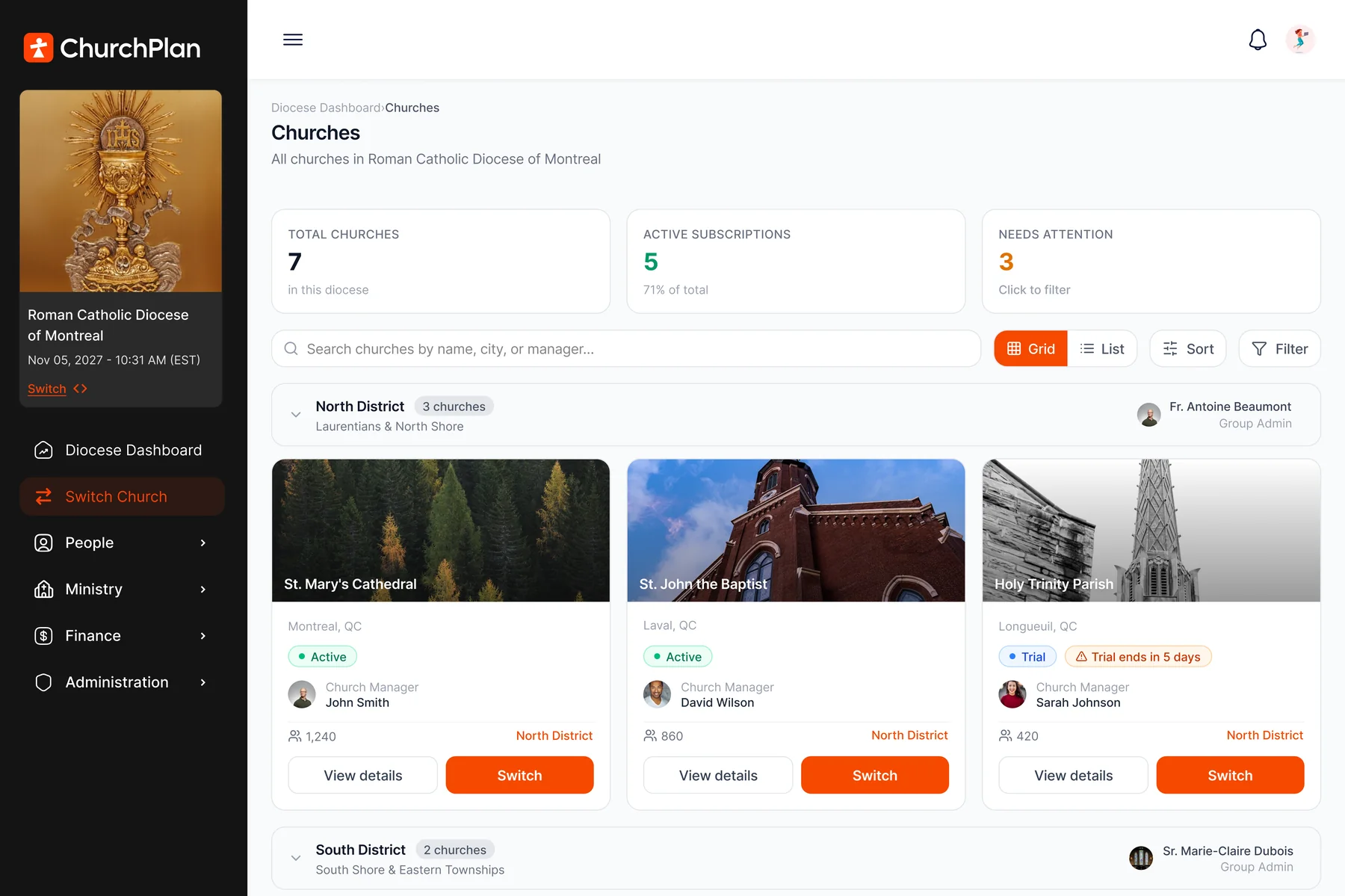
Diocese Dashboard › Churches. Diocese, parish names and figures shown are illustrative.
Total churches, how many hold an active subscription, and how many need attention — as counters you can click to filter, not a report somebody has to assemble.
Parishes roll up into the districts your network actually uses, each with a named group admin. Churches not assigned to a district sit under the diocese directly — no forced structure.
A parish whose trial ends in five days, one with past-due billing, one with nobody assigned to run it — flagged on the card. You find out before the parish calls you, not after.
Each parish shows its church manager and its member count. When a manager leaves, the gap is visible on the dashboard rather than discovered when something stops working.
Search by name, city or manager across the whole network. Seven parishes or three hundred — the screen works the same way.
Every card carries a Switch button. One click and you are inside that parish’s portal with your diocesan role intact — no second account, no password to share.
Step into any church — and everyone can see that you did.
Diocesan oversight only works if it is honest about itself. When a diocesan administrator switches into a parish, a banner stays across the top of every screen naming who is being viewed and where they came from. Nobody is quietly inside someone else’s church.
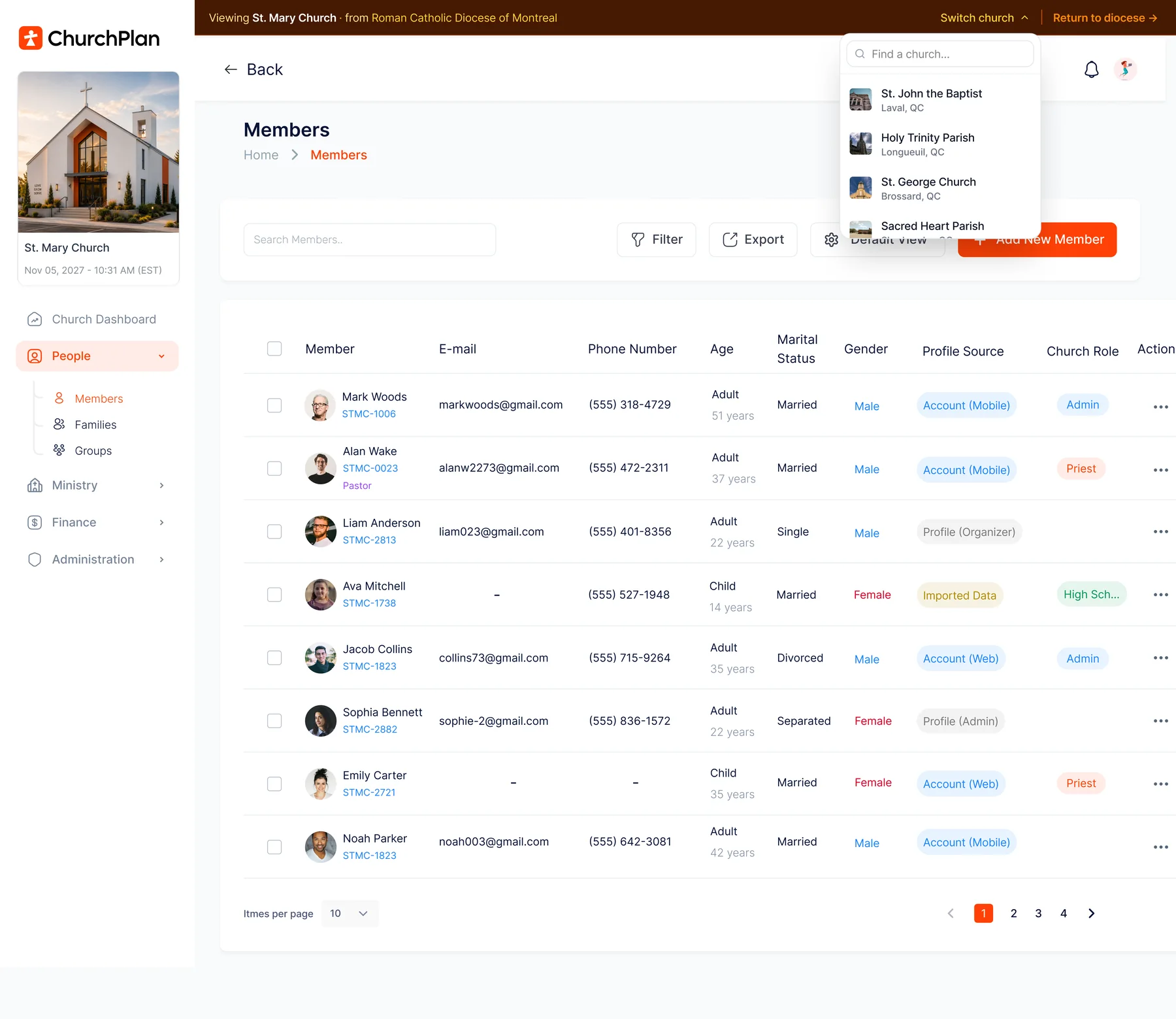
The parish’s own Members screen, viewed from the diocese. Member names and details shown are illustrative.
The context bar does not scroll away. Anyone looking at the screen knows immediately that this is a diocesan session inside a parish, not the parish’s own staff.
A picker in the banner jumps straight to another parish; one link returns to the network view. Reviewing six parishes is six clicks, not six logins.
People, Ministry, Finance, Administration — a diocese isn’t a cut-down view. It is the same platform, every module included, with the parish’s own data inside it.
Account (Mobile), Account (Web), Profile (Admin), Profile (Organizer), Imported Data — every member record says how it got there, so migrated rows are never mistaken for member-verified ones.
Church role is a property of the person in that parish. A priest serving two churches is one identity with two roles, not two accounts to keep in step.
Filter and export from inside the church you’re viewing. The diocese gets what it needs without asking a parish secretary to email a spreadsheet.
Set it once. It holds across the network.
Roles and permissions are administered centrally, so a servant, a priest and a diocesan administrator each see exactly what their role allows — in whichever parish they serve.
Roles that follow the person
A priest serving two parishes, a diocesan finance officer, a district group admin — each is one identity with role-based access, not three accounts to remember and three to revoke.
Least privilege, by default
Access follows the role, not the org chart. Front desk sees a name. A ministry leader sees contact details. Pastoral records stay with clergy. Nobody has to remember to lock anything down.
Reports the diocese can actually run
Attendance, service health and servant coverage across every parish — pick a date range and the fields you need, and export it yourself. No ticket, no waiting on each parish to send a spreadsheet.
One message, every parish’s pocket
A message from the bishop reaches every parish’s feed at once, clearly marked as diocesan — not forwarded down a chain of parish secretaries and out via six different mailing lists.
The network’s week, in one view
Members flip between their own parish and every church they follow. Diocesan staff see the whole network’s calendar in one tab — liturgies, events and services, always current because the modules feed it.
Residency where it’s required
Dioceses and networks with data-residency obligations can keep their data in-region on the Enterprise plan — one decision for the network, not a negotiation per parish.
What the diocese sees. What the parish keeps.
Central administration is not the same as central access to everything. The line is drawn in the architecture, so no parish has to take it on trust.
The shape of the network.
- ›Every parish, its district, its manager and its member count
- ›Subscription status — active, trial, past due, unassigned
- ›Attendance, service health and servant coverage across parishes
- ›The network calendar — liturgies, events and services in one view
- ›Diocesan announcements, and how far they reached
- ›Licensing, plans and platform administration
Its own people and its own money.
- ✓Its member records — held by the parish, never pooled across the network
- ✓Its giving, its funds and its own Stripe payouts
- ✓Its pastoral notes and visit logs, scoped to clergy
- ✓Its own audience decisions, item by item
- ✓A visible banner whenever the diocese is viewing it
- ✓Free-forever Essentials, whatever the diocese licenses above it
The diocese is one setting on the audience dial.
Sharing across a network is not a separate system — it is a choice made per item. Open an event to the wider community, share it across your diocese, keep it to your own congregation, or limit it to one group inside your church. Try it below.
Whichever you choose, only the event details you publish are ever shared. Member and giving data never leave the parish that holds them.
The same dial runs announcements and services.
Availability per service can be set to global with guests welcome, diocese-only, or church-members only — and a diocesan announcement reaches every parish feed at once, clearly marked. See it inside the ChurchPlan App →
A diocese that crosses borders still files locally.
Networks that span countries face several tax authorities and several privacy regimes at once. ChurchPlan applies the right one per parish, automatically, rather than asking a diocesan administrator to keep track.
Receipts, per jurisdiction
Each parish receipts under its own authority — CRA, IRS, ATO or NZ IRD — with UK parishes producing HMRC-ready Giving Statements. Seven years of records, stored free. Automatic Tax Receipts →
Five privacy regimes, one default
PIPEDA, GDPR, CCPA/CPRA and the Australian and New Zealand Privacy Acts are handled by the system, with the strictest reading as the default. Legal Compliance →
Safeguarding the same everywhere
Supervisor-only child attendance, locked unsubscribes and ministry-scoped roles behave identically in every parish — so a network’s youth policy does not depend on which volunteer configured which service. Security →
License across the network. Every parish still starts free.
Dioceses and multi-parish networks license ChurchPlan across all their parishes, on annual volume pricing. Essentials stays free forever for every church underneath — including the ones that join later, and the ones that never upgrade.
Bring the whole network onto one platform.
Start with a single parish this Sunday — no migration, no contract — and extend across the diocese when it has earned it.